A simple keyboard laid over the score, for checking a pitch or a chord without leaving the page.
Piano Keyboard
Bring up a small keyboard over the score to check a starting note or hear a chord. You can keep the passage in view while taking a pitch, without reaching for another instrument.
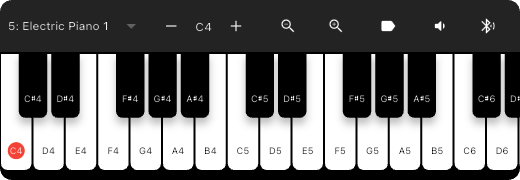
Check a Note Without Leaving the Score
- Tap near the middle of the score to reveal the top bar, then choose MIDI Keyboard.
- Press the keys to play the starting note or chord. If the note is outside the visible range, shift the octave up or down.
- When you have finished checking, use the close button at the top right of the keyboard to return to the score.
For a pitch check, you can start with the current sound. To hear another instrument, choose from the 128 General MIDI (GM) sounds in the control bar. Octave controls change the register; key width changes how easily you can press the onscreen keys. Key Labels shows the note names on the keys.
Drag the panel if it covers the passage you need to read. To change its volume or the speaker you hear, open Mixer Settings from the keyboard's control bar.
Play from an External MIDI Keyboard
Connect the keyboard through MIDI Device Picker in the control bar. Connecting a device does not resolve a mismatched input channel.
In Global Settings → MIDI devices → MIDI input channels, match the Sound row (default 1) to the channel sent by your keyboard. If you do not know that channel, open Receive check on the same screen, press a key, and read the channel received.
You can connect multiple keyboards and controllers. Two devices fixed to the same channel cannot be separated into sound and score-control uses. In that case, check whether the device lets you change its sending channel.
If the Sound Is Missing or Late
- The onscreen keyboard is silent too — Open Mixer Settings from the control bar and check the keyboard's level, mute, and output. Get an onscreen key sounding first to separate an input problem from an output problem.
- Onscreen keys sound, but the external keyboard is silent — Check its connection in MIDI Device Picker, then match the channel shown in Receive check to the Sound row.
- Notes arrive late after you press a key — If you use Bluetooth audio, try the same note through the built-in speaker or wired headphones. The external keyboard's Bluetooth MIDI connection and the sound output are separate settings.
For returning to reading and turning pages, see Score Viewer.